
chronoMeans Dunyazad
Owner's Guide
The official guide to chronoMeans Dunyazad, a kinetic artwork that gives form and motion to the passage of time. From installation and first startup to everyday care and Care Service, it covers everything an owner needs to know.

Introducing chronoMeans and Dunyazad
01
Thank you for choosing to become a collector of chronoMeans.
chronoMeans is a kinetic work of art that explores the passage of time and the meaning we find within it. Crafted in metal, it embodies both the permanence and fluidity of time. The movement of the balls and the flowing lines of the tracks give physical form to time's continuous passage, reflecting the rhythms and experiences of our lives.
Each ball carries a moment — joy, sorrow, anticipation, stillness. As a ball reaches the end of its track, we encounter both the sense of time passing away and the quiet arrival of a new beginning.
As the name chronoMeans suggests, time is not simply something that passes. It is a means through which moments acquire meaning and our lives take shape. More than a timepiece, chronoMeans is an invitation to contemplate the nature of time and our existence within it.
Shahrazad & Dunyazad
The names of chronoMeans' first model, Shahrazad, and its second, Dunyazad, are drawn from the two sisters in One Thousand and One Nights.
Night after night, Shahrazad tells stories beside the king, carrying one tale into the next. Her stories unfold without end, connecting one night to another. This image of an ever-continuing story inspired the name Shahrazad for the first chronoMeans model — a work that gives form to the passage of time through moments that never repeat.
Dunyazad, Shahrazad's younger sister, is the listener closest to these stories. Each night, she asks her sister for another tale, creating the moment from which the story begins anew. If Shahrazad is the one who keeps the story alive, Dunyazad is the one who invites it to begin again.
The second chronoMeans model was therefore named Dunyazad. Just as the story continues from Shahrazad to Dunyazad, the two models carry forward the same story of time, each in its own form.
This guide is the first step toward experiencing chronoMeans as it was intended.
02
About This Guide
This guide provides the essential information you need to install and use chronoMeans safely and correctly, and to keep the artwork in the best possible condition for years to come.
chronoMeans is a precisely built and calibrated kinetic artwork. Please read this guide thoroughly before beginning installation and use, and follow the safety and handling instructions in particular.
This guide covers the information needed for installation, time setting, everyday use and care, and basic troubleshooting. For more detailed information, the latest guidance, and details on service and support, please refer to the official chronoMeans website.
Artwork Label and Serial Number
Each chronoMeans is assigned a unique Serial Number that identifies the artwork, found on the label on the underside of the Drive Base.
The serial number is important information for identifying the artwork and for service and warranty support. Please take care not to damage or remove the label and serial number.
When requesting service or support, having your serial number and purchase information ready will help us assist you more smoothly.
Changes to Specifications and This Guide
chronoMeans may be continuously improved to enhance the artwork's refinement and performance. As a result, the detailed specifications, components, or contents of this guide are subject to change without prior notice.
Please refer to the official chronoMeans website for the latest information.
Copyright
Rights to the text, images, drawings, and other content contained in this guide belong to ABRASAX Design Group Co., Ltd.
Except where permitted by applicable law, no part of this guide may be reproduced, distributed, modified, or used for commercial purposes in whole or in part without the company's prior written consent.
Guidance and Liability
This guide provides general guidance to help you install, use, and care for chronoMeans correctly. Do not disassemble, modify, or repair the artwork on your own, and if a problem or abnormality not covered in this guide occurs, please contact chronoMeans Care.
Damage resulting from improper installation or use, unauthorized disassembly or modification, or the use of power supplies or accessories that are not recommended may affect warranty or service coverage.
Company ABRASAX Design Group Co., Ltd.
Artwork chronoMeans
Website www.arxdg.com
Support chronoMeans Care
Please check the official website for the latest version of this guide and support information.
03
Safety Guidelines
Power and Cables

Use only within the rated power range
Use only a power supply that matches the rated range marked on the artwork and the Charger. The rated power range is 100–240 V AC, 50/60 Hz, and no separate transformer is required within that voltage range. If the outlet shape is different, use a plug conversion adapter that meets the standards of your country.
Adapter Input 100–240V AC · 50/60Hz · 0.5A
Adapter Output 5V DC · 2.1A (10.5W)

Stop using the artwork if the power cord or plug is damaged
Using a damaged power supply carries a risk of electric shock, short circuit, or fire. If the cord is frayed or kinked, or the plug is damaged, disconnect the power and contact chronoMeans Care or an authorized service center.

Do not place heavy objects on the artwork
Stacking objects on the artwork or applying a heavy load can cause damage or malfunction.

Do not overload the outlet
Do not share a power strip or outlet with high-power appliances such as heaters, and ensure a stable power environment. Overloading can cause electric shock or fire.
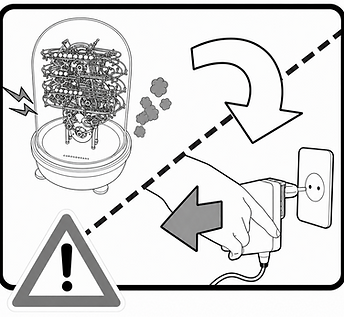
If you notice smoke, a burning smell, or unusual noise, disconnect the power immediately
Do not continue using the artwork; contact chronoMeans Care or an authorized service center.

Do not handle the power plug with wet hands
There is a risk of electric shock, so connect or disconnect the power only when your hands are completely dry.

Do not place objects on the power cord or bend it sharply
Route the cable so it is not pinched or bent excessively. A damaged cable can cause electric shock or fire.

Do not use the plug in a loose outlet
If the plug does not sit firmly in the outlet, disconnect the power and use a secure outlet. A loose connection can cause a short circuit or fire.

Route the power cord safely so no one can trip over it
Keep the cable away from walkways and foot traffic, and do not place it where people could step on or pull it.
Installation Environment and Handling

Install out of the reach of children
Because the artwork has moving parts, take care that children do not reach or operate it.

Keep the time-indicating balls and small parts away from children
If a small part is swallowed, seek medical help immediately.

Do not install on an unstable or sloped surface
Install on a flat, stable table. If it is not level, the balls may fall off or the artwork may be damaged or malfunction.

Do not use in damp locations
Avoid environments with high humidity or possible water contact, such as bathrooms. There is a risk of electric shock or fire.

Keep away from direct sunlight and heat sources
Excessive heat can damage the artwork or increase the risk of fire.

Do not install where temperatures change rapidly
Environments where condensation can form may cause electric shock, fire, or malfunction of the artwork.
Operation, Cleaning, and Moving

Do not disassemble, modify, or repair the artwork yourself
There is a risk of electric shock or short circuit. If something is wrong, contact chronoMeans Care or an authorized service center.

Disconnect the power when not in use and before cleaning
Turn the artwork off and unplug it from the outlet before you begin cleaning.

Do not spray water, detergent, or solvents directly onto the artwork
Benzene, thinner, and similar substances can damage the artwork or cause electric shock or fire.

Before moving the artwork, disconnect the power and hold the Drive Base securely
When moving it, handle it carefully given its weight and precision structure, and have two people work together if needed.

Do not strike the rails or apply strong force
If a rail bends, the balls may fall off or the artwork may malfunction.
04
Before Installation


Prepare a stable, level table with plenty of clearance around it.
Avoid places with vibration, near direct sunlight or heat sources, spaces with rapid temperature changes or high humidity, and locations where the artwork could be knocked or the cable pulled.
The packing box and the Main Body must always be handled by two adults together. Wear the enclosed gloves, and take care not to use or grip the moving precision mechanisms — such as the rails, gears, and balls — as handles.
05
Artwork Structure and Enclosed Contents
BOX A - The box to open first during installation

Drive Base
The lower section of the artwork. It contains the motor and drive mechanism that powers the movement, and includes the USB-C power connection on its underside. Place it on a flat, stable surface and confirm it is level with the Spirit Level before mounting the Main Body.
Caution: This part is heavier than it appears. Hold it firmly with both hands and take care not to drop it.

USB-A power adapter
Plugs into a wall outlet and supplies power to the artwork via the USB-A to USB-C cable.
Adapter Input
100–240V AC · 50/60Hz · 0.5A
Adapter output 5V DC · 2.1A (10.5W)

Magnetic Viewer Film
A film that lets you see the movement of the magnetic field. Use it to check that the Drive Base works properly after connecting the power.

USB-A to USB-C Cable
Used to connect the charger (USB-A) to the Drive Base (USB-C).

Spirit Level
A level installation surface is important. Use it to check that the Drive Base is level after installation.


Power plug types: TYPE J / TYPE G / TYPE A
A charger with a Type C plug (Korean/European standard) is supplied.
In countries that use a different plug type, you must use an appropriate conversion adapter. Depending on the country of the boutique where the artwork is sold, one of the following plugs is supplied: Type J, Type G, or Type A.